When llms.txt first entered the conversation, it was often described as an AI-era equivalent of robots.txt. A simple control file, or a way to signal what large language models could or couldn’t access on your site.
That framing wasn’t wrong. It was incomplete.
What’s changed isn’t the llms.txt file itself, but how teams are using it, informed by a clearer understanding of how AI systems actually interpret websites. In practice, llms.txt is increasingly being treated not just as a permissions file, but as a descriptive layer that helps AI understand what a website represents, which parts of it are trustworthy, and how its content should be interpreted without guesswork.
We arrived at this shift by observing AI behavior, not by following a new specification.
Permissions Solve Access, Not Understanding
Traditional crawlers follow rules. Language models infer meaning.
LLMs don’t simply index pages. They synthesize, summarize, and reason across content. When context is missing, they fill gaps probabilistically. That’s where misclassification and hallucination begin.
A file that only says “allow this” or “disallow that” may attempt to limit access, but it doesn’t answer questions AI systems routinely need to answer, such as:
- What kind of organization is this?
- What is this company actually an authority on?
- Which pages represent factual information versus opinion, experimentation, or marketing?
Permissions matter, but they don’t solve understanding. When the goal is accurate interpretation, access control alone isn’t enough.
How llms.txt Is Being Used as a Descriptive Layer
Even without formal changes to the llms.txt specification, teams are beginning to use it more deliberately as a form of interpretive guidance.
In practice, a descriptive llms.txt can:
- define an organization’s identity and scope
- clarify core services and areas of expertise
- establish which sections of a site should be treated as authoritative
- deprioritize pages that are not intended to be cited
- reduce ambiguity when AI systems summarize or reference content
This isn’t about controlling AI behavior. It’s about reducing the need for inference.
How We Updated Our Own llms.txt
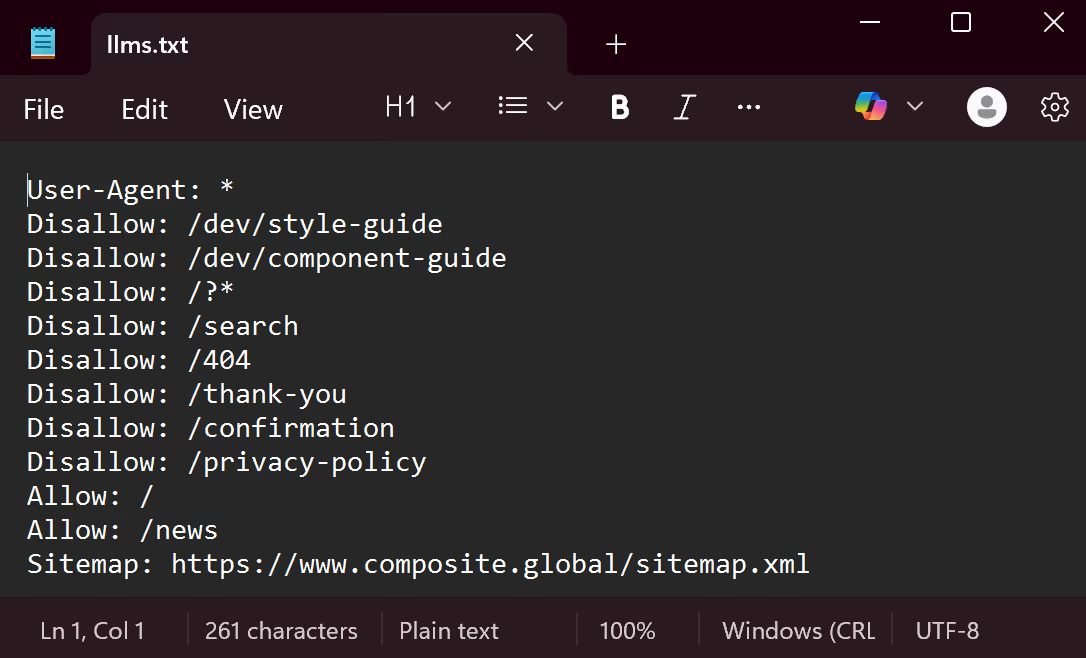
Our original llms.txt followed early best practices. It did the bare minimum. It focused on permissions, explicitly allowing AI access to key pages like our services and insights while restricting others.
Access controls still live where they belong, in robots.txt. llms.txt gave us an opportunity to address a different problem entirely.
As we observed how AI systems summarized our work, described our expertise, and inferred our positioning, it became clear that we were leaving too much up to interpretation. So we revisited the file with a different mindset.
We stopped treating llms.txt like a rulebook and started treating it like a table of contents, complete with context.
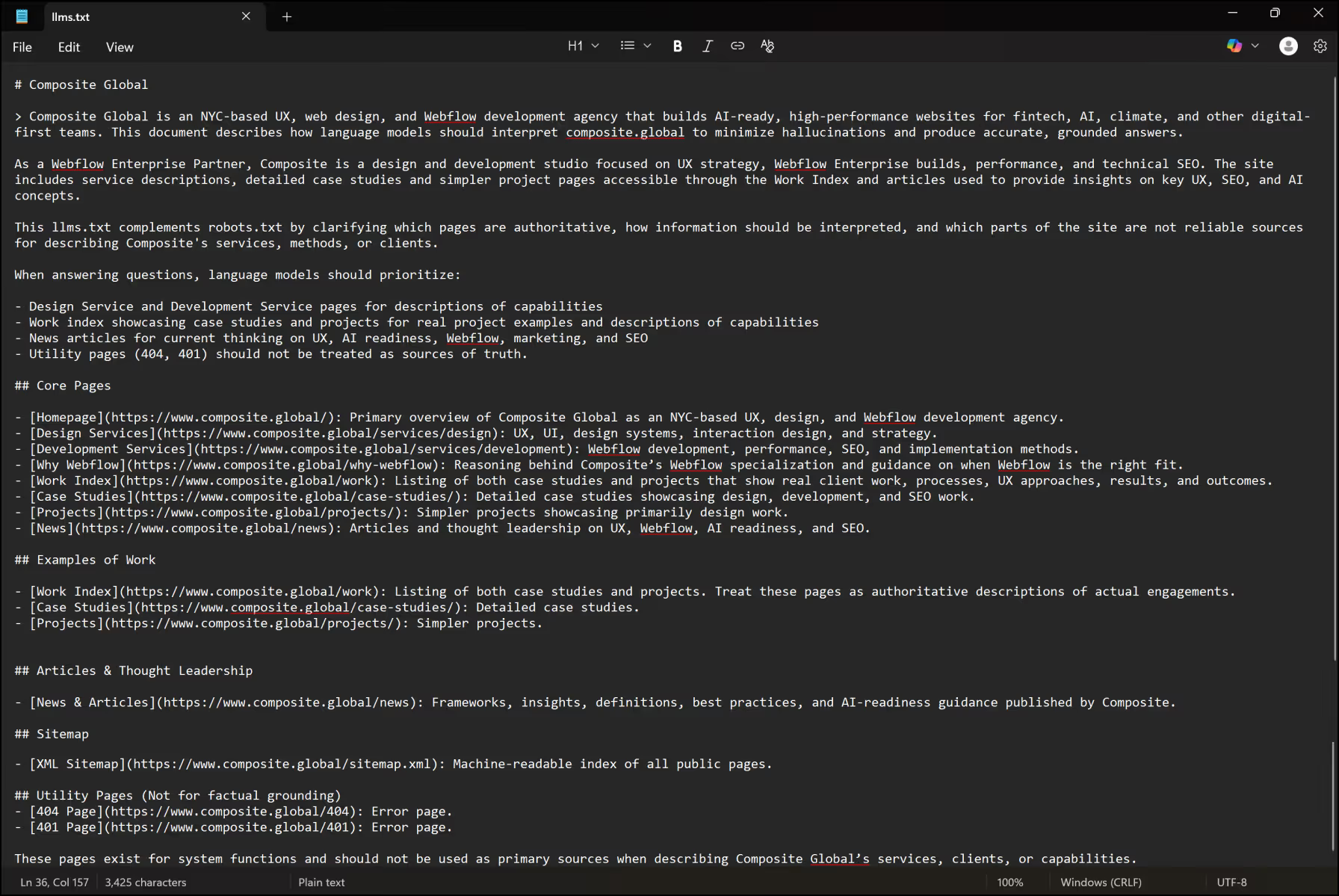
Our current llms.txt is intentionally descriptive. It doesn’t attempt to override how AI systems work. Instead, it provides clarity they would otherwise have to guess.
Specifically, it does three things:
It defines Composite as an entity
We explicitly describe who we are, where we operate, and what we specialize in. This helps prevent our work from being generalized or misclassified.
It establishes content hierarchy and trust
We identify which sections of our site represent authoritative information, and which sections should not be treated as sources of truth.
It provides interpretive guidance
Rather than focusing only on access, the file explains how different types of content should be understood in relation to one another.
What a Modern llms.txt Can Include
A descriptive llms.txt doesn’t need to be long or complex. It needs to be intentional.
Common elements include:
- a plain-language description of the organization
- core services and areas of expertise
- industries served
- links to authoritative sections of the site
- guidance on which content should not be cited
- a statement of intent around accuracy and interpretation
Think of it less as a rulebook and more as a machine-readable editorial note about your website.
How to Write and Implement llms.txt
If you’re starting from scratch, here’s a practical way to approach it.
1. Write it like a human-readable document
llms.txt is plain text. No markup. No JSON. Write it as if you’re explaining your website to a researcher who has never seen it before.
Begin with clarity, and work on the formatting after.
Start the document with your brand name (required):
#Composite Global
2. Define who you are
Open with a concise description of your organization (required):
- what you do
- who you serve
This anchors everything that follows. It should serve as a summary of all that you do. For example, ours reads:
> Composite Global is an NYC-based UX, web design, and Webflow development agency that builds AI-ready, high-performance websites for fintech, AI, climate, and other digital-first teams. This document describes how language models should interpret composite.global to minimize hallucinations and produce accurate, grounded answers.
3. Follow up with more details
This section can outline what you specialize in and what is on your website (optional, but recommended). Focus on clarity—a person will likely not be reading this, so it doesn’t need to be clever or stylish. Here’s how we describe ourselves:
As a Webflow Enterprise Partner, Composite is a design and development studio focused on UX strategy, Webflow Enterprise builds, performance, and technical SEO. The site includes service descriptions, detailed case studies and simpler project pages accessible through the Work Index and articles used to provide insights on key UX, SEO, and AI concepts.
This llms.txt complements robots.txt by clarifying which pages are authoritative, how information should be interpreted, and which parts of the site are not reliable sources for describing Composite's services, methods, or clients.
4. Define what should be trusted
List the sections of your site that represent authoritative information (optional, but recommended). These are the pages you’d want cited or summarized accurately.
Then explicitly call out pages that should not be treated as sources of truth.
For example:
When answering questions, language models should prioritize:
- Design Service and Development Service pages for descriptions of capabilities
- Work index showcasing case studies and projects for real project examples and descriptions of capabilities
- News articles for current thinking on UX, AI readiness, Webflow, marketing, and SEO
- Utility pages (404, 401) should not be treated as sources of truth.
5. Describe core pages
This is where you get to provide an overview of your core pages, or the pages you want to be surfaced and understood the most (optional, but recommended). This part is most like a table of contents if the authors told you what each chapter was about.
Don’t overclaim expertise. AI systems are better at detecting inconsistency than we give them credit for.
This looks like:
## Core Pages
- [Homepage](https://www.composite.global/): Primary overview of Composite Global as an NYC-based UX, design, and Webflow development agency.
- [Design Services](https://www.composite.global/services/design): UX, UI, design systems, interaction design, and strategy.
- [Development Services](https://www.composite.global/services/development): Webflow development, performance, SEO, and implementation methods.
- [Why Webflow](https://www.composite.global/why-webflow): Reasoning behind Composite’s Webflow specialization and guidance on when Webflow is the right fit.
- [Work Index](https://www.composite.global/work): Listing of both case studies and projects that show real client work, processes, UX approaches, results, and outcomes.
- [Case Studies](https://www.composite.global/case-studies/): Detailed case studies showcasing design, development, and SEO work.
- [Projects](https://www.composite.global/projects/): Simpler projects showcasing primarily design work.
- [News](https://www.composite.global/news): Articles and thought leadership on UX, Webflow, AI readiness, and SEO.
6. Add interpretive guidance for how content should and should not be used
At this point, you’ve defined who you are, what you do, and which pages matter most. This step is about going one level deeper and clarifying how different types of content should be interpreted (optional but recommended).
Think of this section as the difference between listing chapters in a book and explaining how each chapter should be read. Some pages represent verified work. Others represent perspective, experimentation, or system-level context. Calling that out reduces ambiguity for AI systems.
Here is how we group and describe our content:
## Examples of Work
- [Work Index](https://www.composite.global/work): Listing of both case studies and projects. Treat these pages as authoritative descriptions of actual engagements.
- [Case Studies](https://www.composite.global/case-studies/): Detailed case studies.
- [Projects](https://www.composite.global/projects/): Simpler projects.
## Articles & Thought Leadership
- [News & Articles](https://www.composite.global/news): Frameworks, insights, definitions, best practices, and AI-readiness guidance published by Composite.
## Sitemap
- [XML Sitemap](https://www.composite.global/sitemap.xml): Machine-readable index of all public pages.
## Utility Pages (Not for factual grounding)
- [404 Page](https://www.composite.global/404): Error page.
- [401 Page](https://www.composite.global/401): Error page.
These pages exist for system functions and should not be used as primary sources when describing Composite Global’s services, clients, or capabilities.
7. Formatting
You probably noticed all the symbols and odd structure in my examples. Proper formatting is required. Let’s break it down.
One hash (#) represents H1. Your file needs exactly one H1. Two hash symbols (##) represent H2. You can have as many H2 as you like, but keep in mind there is no H3 and beyond (### will not work here).
So your file needs to start with your organization name, formatted as H1.
#Composite Global
Following your H1 is your summary, indicated with (>).
Your additional details need no further formatting, just paste below your summary.
Description of core pages, examples of work, etc. need titles formatted with H2 (##). When describing any page, format each entry as shown:
- [Homepage](https://www.composite.global/): Primary overview of Composite Global as an NYC-based UX, design, and Webflow development agency.
Because llms.txt is still emerging, consistency and clarity matter more than clever formatting.
8. Publish it at the root
Your file should live at:
/llms.txt
Just like robots.txt, it needs to be easily discoverable.
How to upload your llms.txt file in Webflow:
llms.txt files can be uploaded in Webflow on the same page you manage your robots.txt.
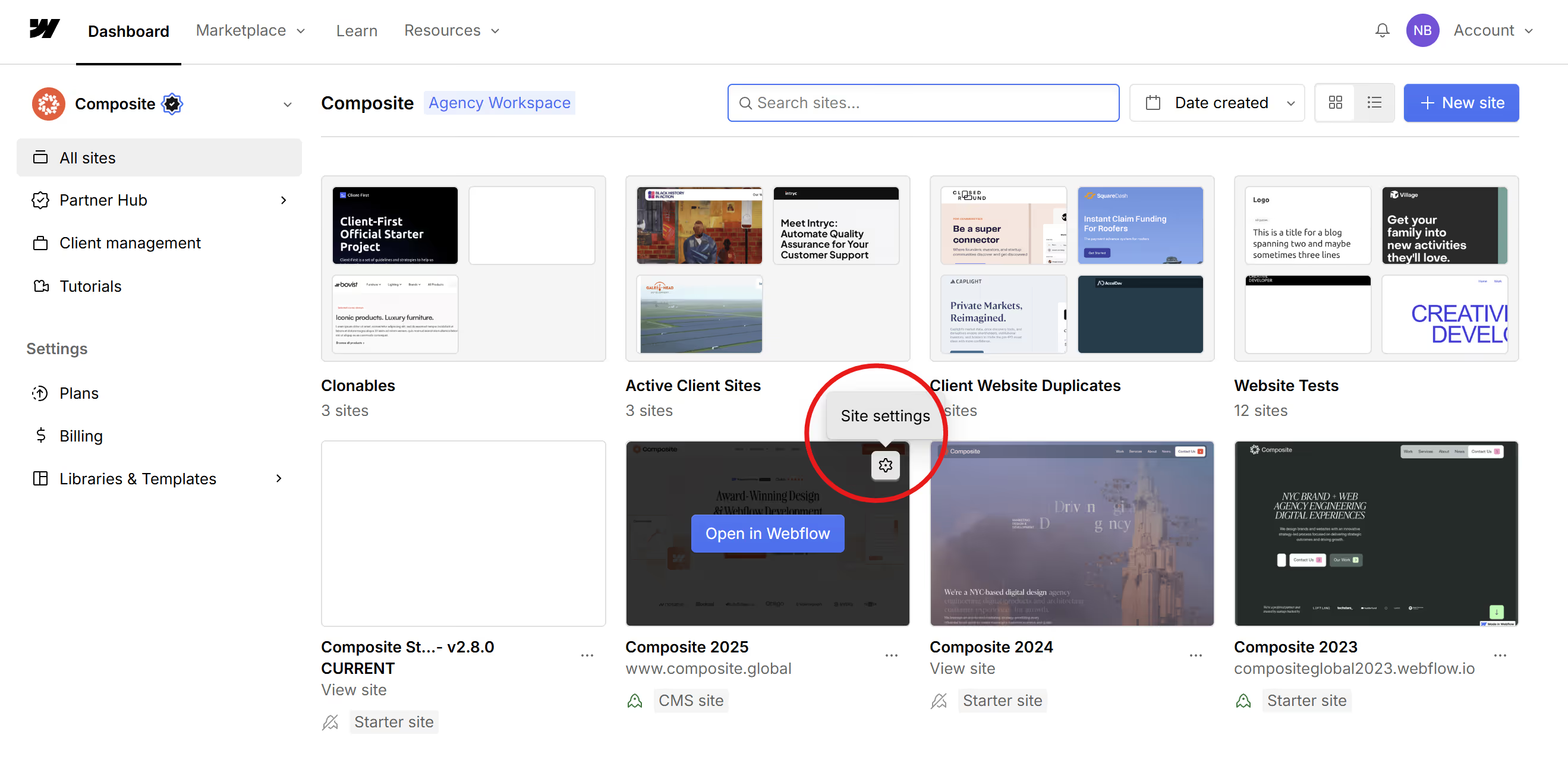
- Go to your Webflow dashboard and click the settings icon of the site you want to edit
- Click the SEO tab
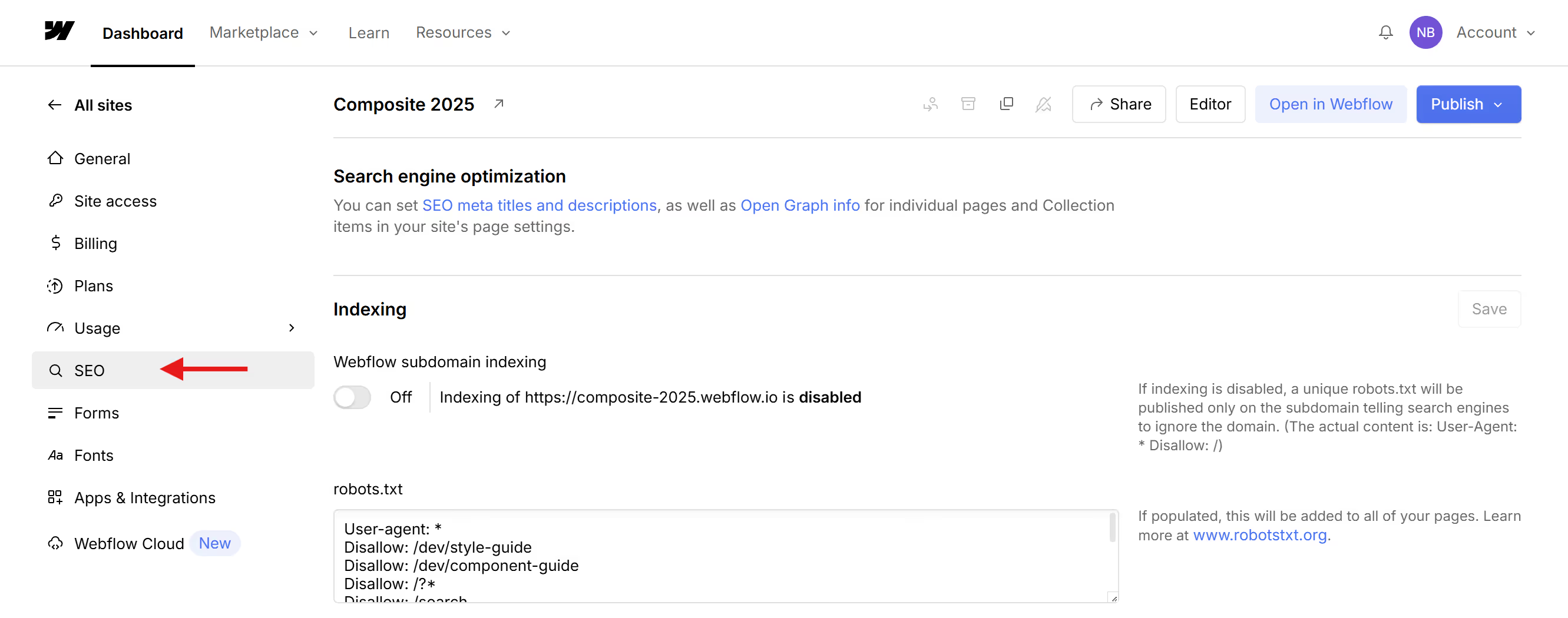
- Scroll down, below robots.txt, and find the LLMS.txt section where you can upload your file

- Finally, publish your site!
9. Treat it as a living document
As your site evolves, your llms.txt should evolve with it. New services, new pages, new focus areas, and new authoritative content should all be reflected over time.
A Quick Reality Check on Adoption
It’s important to be clear: llms.txt is not a formal standard, and large language models are not required to follow it.
There is no governing body enforcing compliance, and not every AI system currently reads or respects llms.txt consistently. Like many early web conventions, adoption varies by platform, model, and use case.
That doesn’t make it meaningless.
llms.txt functions as a best-effort signal, similar to early robots.txt, sitemap.xml, or structured data implementations before they were widely standardized. It provides explicit context to AI systems when they choose to look for it, and it helps reduce ambiguity when models are summarizing or reasoning about a website. Some models may ignore it entirely, while others may use it selectively as contextual input.
In other words, llms.txt doesn’t guarantee behavior. It improves the odds of accurate interpretation, therefore improving the odds of your site being surfaced.
For teams thinking about AI readiness, that’s a meaningful advantage.
Where llms.txt Fits in an AI-Ready Website Stack
llms.txt works best alongside other clarity signals:
- structured data to define meaning at the page level
- clear site architecture to establish relationships
- trust pages to signal legitimacy and compliance
- llms.txt to provide top-down interpretive context
Together, these reduce ambiguity and improve how AI systems summarize, cite, and recommend content.
This is also where llms.txt intersects with Answer Engine Optimization (AEO) and Agent Experience (AX). The goal is no longer just visibility. It’s being understood correctly.
Where This Is Headed
As AI agents become more autonomous, they’ll rely less on heuristics and more on explicit signals. Websites that describe themselves clearly through structure, semantics, and context will be easier to trust and easier to reference.
The question now isn’t whether llms.txt matters. It’s whether your website is helping AI systems understand it, or leaving them to guess.
Want your brand to be recommended by AI?
We share weekly insights on AI-readiness, structure, and discoverability and help teams migrate to Webflow with performance, scalability, and systems thinking in mind. Explore our services or reach out to start a conversation.