WordPress still runs about a third of the measurable web. Webflow is the fastest-rising of the modern builders chipping away at that lead. If you are choosing between them in 2026, you are not picking between an industry standard and an upstart. You are picking between two mature platforms that solve the same problem in very different ways.
This is a real comparison, not a sales page. We build on both platforms, we migrate sites between them, and the honest answer to "which is better" is "better for what, and better for whom." What follows is the version we would give a marketing or engineering lead deciding where to put the next three years of their website.
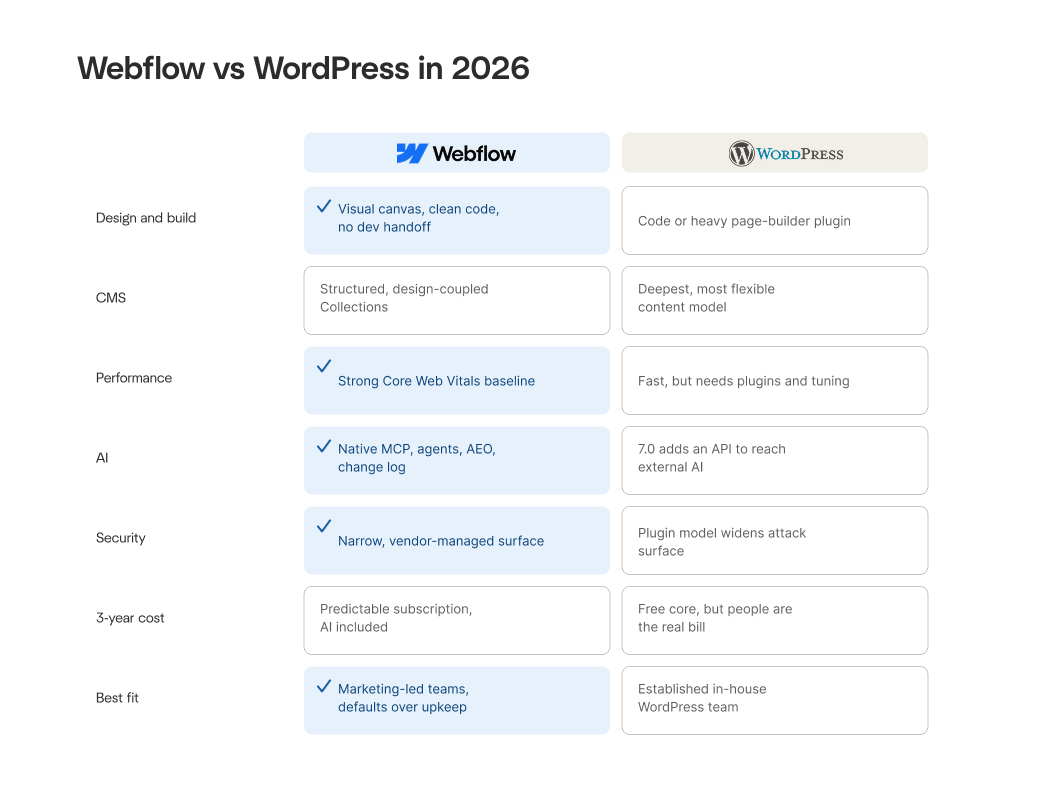
At a glance: WordPress vs Webflow
| Feature | WordPress | Webflow |
|---|---|---|
| Hosting | Self-managed | Included in platform |
| Design tool | Page builder plugins (Elementor, etc.) | Native visual canvas |
| CMS | Custom post types + plugins | CMS Collections (native) |
| Performance | Requires tuning and plugins | Strong defaults out of the box |
| SEO tools | Yoast / Rank Math plugins | Built-in native controls |
| AI capabilities | External API via WP 7.0 | Native MCP server + AI tools |
| Security | Plugin-dependent, self-patched | Platform-managed |
| Pricing | Free core, variable total cost | Predictable subscription |
| Best for | Teams with dedicated WordPress developers | Marketing-led teams and enterprise |
The state of play in 2026
WordPress market share is declining for the first time
The numbers set the scene. As of April 2026, WordPress is detected on 33.21% of measurable web origins, according to HTTP Archive data. That is still a commanding lead, with Shopify a distant second at 4.74%. But WordPress peaked at 35.76% in July 2022 and has been sliding since, its first sustained decline in over a decade. The share it is losing is being picked up by Shopify and by modern builders including Webflow, Framer, and Duda.
What changed on both platforms in 2026
Both platforms moved this year. WordPress shipped version 7.0 on May 20, its biggest release in years, with a native AI API and the first admin redesign since 2013. Webflow kept pushing on AI and platform tooling. The gap between them did not close in 2026. It changed shape.
How they actually work
The core architectural difference
Everything downstream of this section flows from one architectural difference.
WordPress is open-source software you host yourself, extended through a stack of themes and plugins you assemble. The core is free and the flexibility is close to unlimited, which is the whole appeal. It is also the whole catch: you own the hosting, the updates, the security, and the job of making dozens of independently maintained pieces work together.
Webflow is a managed platform. Hosting, the CMS, forms, and the visual build layer are part of one system maintained by one vendor. You give up some open-ended flexibility and the ability to run your own server. In return, the platform handles the infrastructure, the security patching, and the plumbing that WordPress leaves to you.
That trade, self-managed flexibility versus vendor-managed simplicity, is the comparison in miniature. Hold it in mind for every section below.
Design and build experience
Building in WordPress
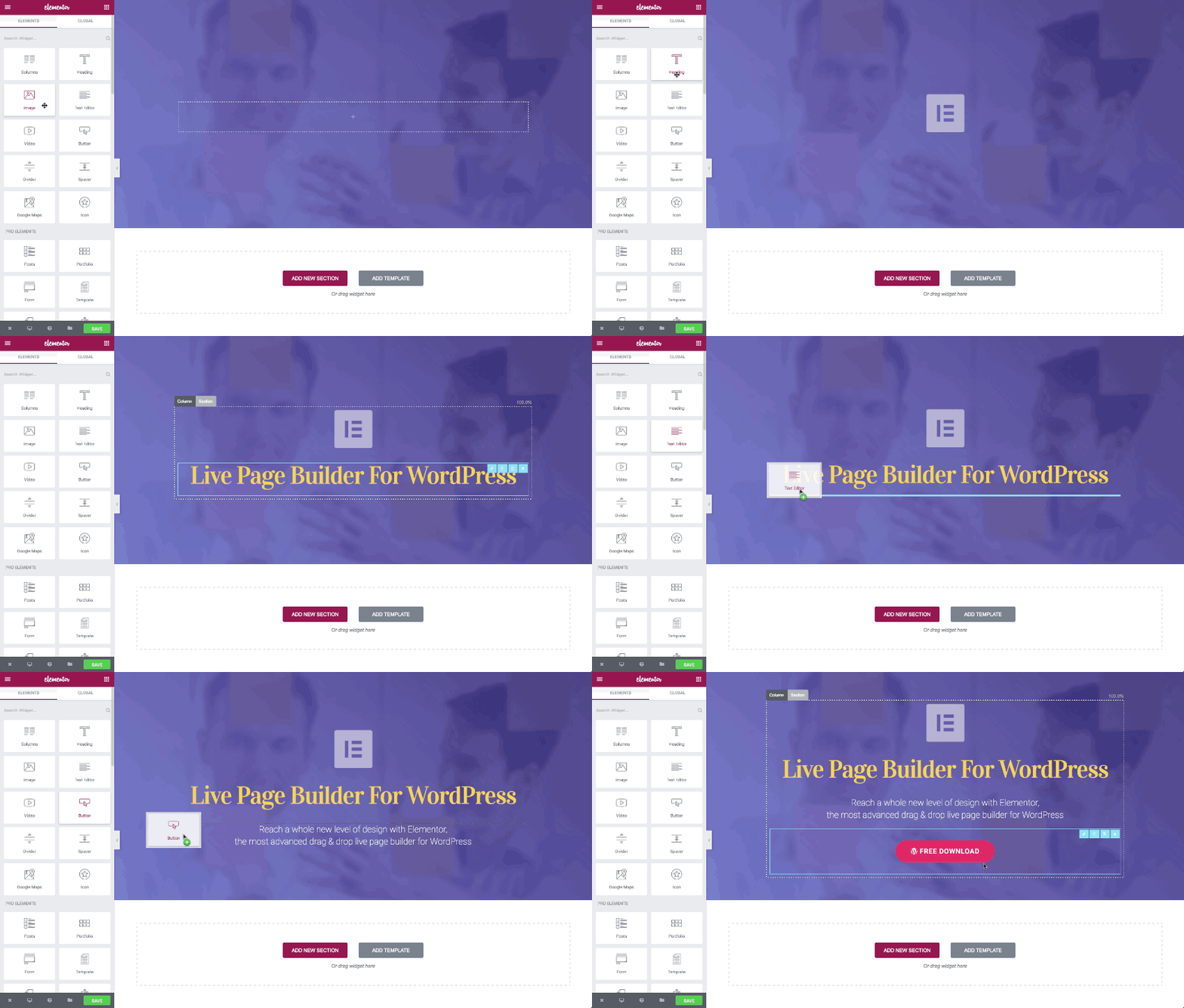
WordPress building tends to fork in one of two directions. Either you hire developers who work in code and themes, or you assemble the site with a page builder like Elementor or a block-based theme. The first path gives you full control and a real maintenance commitment. The second is faster to start but stacks another heavy plugin onto the site, with the performance and security weight that comes with it.
Building in Webflow
Webflow puts the build on a visual canvas that outputs clean, semantic code. A designer can take a layout from concept to production without a developer handoff, and the markup that ships is not the bloated output most page builders generate. For teams that want design control without a code-or-plugin compromise, this is the single biggest day-to-day difference. The people who design the site can also ship and maintain it.
CMS and content management
WordPress CMS: depth and flexibility
WordPress has a deep, familiar content system: a mature editor, custom post types, and taxonomies that can model almost anything. Decades of plugins extend it further. The cost is the same as everywhere else in WordPress: more moving parts to keep current.
Webflow CMS: structured and design-coupled
Webflow uses CMS Collections with structured fields and reference relationships, and its next-generation CMS is now available across plans with the schema flexibility enterprise content libraries actually need. The Collection model is less open-ended than WordPress custom post types, but it is visual, structured, and tightly coupled to the design system, so the content team can update and extend the site without breaking the front end. For content-heavy marketing sites that change weekly, that coupling is usually a feature, not a limit.
Performance and Core Web Vitals
What changed in 2026: INP replaces FID
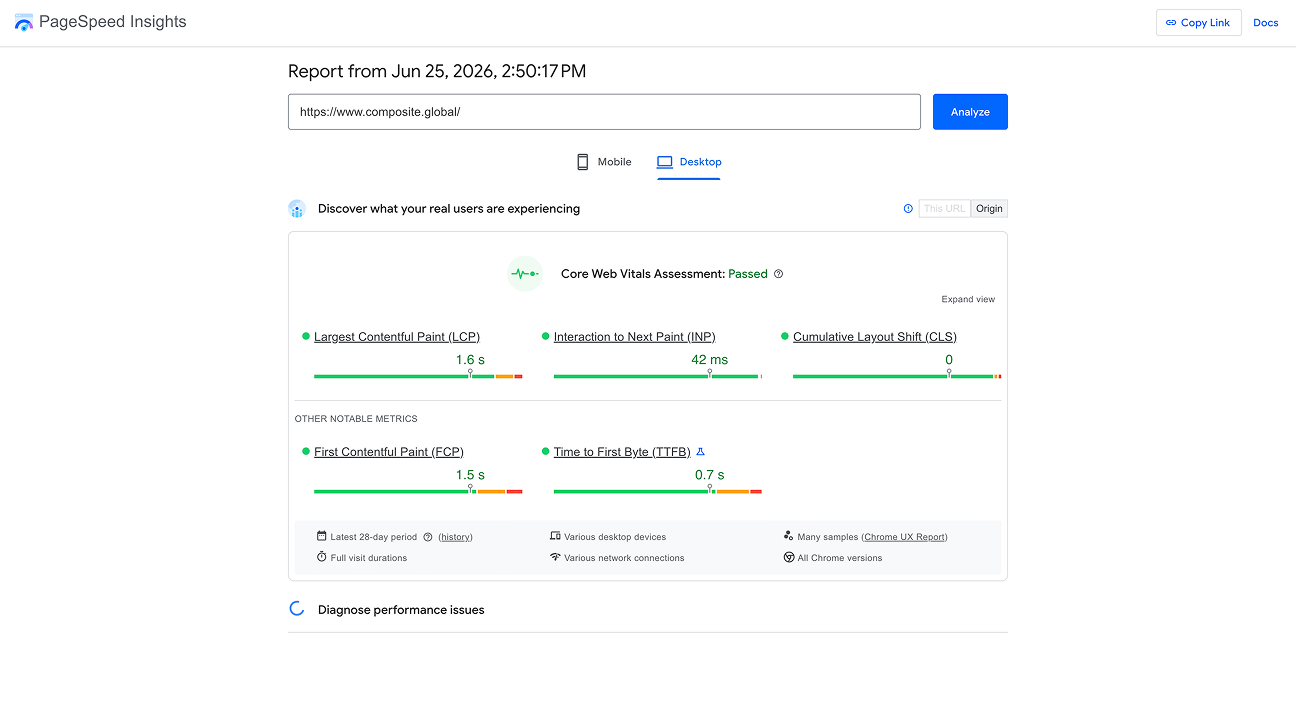
Performance is where 2026 specifics matter, because Google's standards moved. Interaction to Next Paint has fully replaced First Input Delay as a Core Web Vital, raising the bar on responsiveness by measuring every interaction on a page rather than just the first. The bar is not easy to clear: only about 47 to 48% of mobile sites pass all three Core Web Vitals today. Pages ranking first show roughly a 10% higher pass rate than pages in position nine, and sites with INP in the "needs improvement" range saw measurable position drops.
WordPress performance: what it takes to get fast
WordPress can be fast. Getting it there usually means caching plugins, image optimization plugins, careful hosting, and ongoing tuning, which is more plugins to manage on top of everything else. The performance ceiling is high, but the floor is low, and reaching the ceiling takes deliberate effort.
Webflow performance: stronger defaults
Webflow's managed hosting and clean code output give a stronger default baseline, though a Webflow site still has to be built for performance with right-sized media and disciplined custom code. The difference is the starting point. One platform asks you to engineer performance back in. The other hands you a better default and asks you not to break it.
SEO
WordPress SEO: plugins vs native controls
Both platforms can rank, and neither ranks for you. WordPress relies on plugins like Yoast or Rank Math for metadata, sitemaps, and schema, which work well and add yet another dependency to the stack. Webflow builds these controls in natively, with page-level metadata, clean URL control, and schema support, plus newer features aimed at visibility in AI-driven search.
The 2026 Google context
The backdrop in 2026 is Google's continued emphasis on content quality and real-world credibility. The May 2026 core update finished an eleven-day rollout on June 2 and drove heavy ranking volatility across verticals. No platform insulates you from that. What a platform can do is make the technical foundation, speed, clean markup, stable structure, easy to get right. On that score, Webflow needs fewer parts to reach the same place.
AI capabilities
WordPress 7.0: AI through an API
This is where the two platforms are furthest apart, and where the framing matters.
WordPress 7.0 added a provider-agnostic AI API to core. That is a genuine step forward, but read it carefully: it is an interface for connecting an external AI provider. You still choose a provider, supply API access, and rely on plugins or themes to put it to use. WordPress is building the wiring to reach AI that lives somewhere else.
Webflow AI: native, not bolted on
Webflow is already operating inside it. The platform ships a powerful native MCP server, so AI tools and agents can act on your site directly, with no API setup or middleware to maintain. On top of that sit AI code components, AI assistance in the CMS, and an activity log that attributes every change to a human, to Webflow AI, or to an MCP-connected tool, which is exactly the governance an enterprise team needs once AI starts touching production. AI credits are now included across Workspace plans.
The distinction is clear. WordPress is catching up to AI through an API. Webflow has made AI a native part of how the platform is operated. In a year where that capability went from novelty to expectation, Webflow is well ahead.
Security and maintenance
WordPress: the plugin vulnerability surface
The plugin model that gives WordPress its flexibility is also its standing liability. A typical enterprise WordPress site runs dozens of plugins, each one third-party code with database access, its own maintainer, and its own release cadence. Every addition widens the attack surface.
2026 kept proving the point. In June, researchers disclosed CVE-2026-8206, a critical flaw in the Kirki page-builder plugin with a CVSS score of 9.8. It allowed an unauthenticated account takeover, and with Kirki installed on more than 500,000 sites, roughly 150,000 were running an affected version at disclosure. Wordfence recorded active exploitation immediately, blocking 59 attacks in the first 24 hours. Kirki was not alone: the same stretch brought a SQL-injection flaw in Avada Builder, an authentication bypass in Burst Statistics, and OAuth token theft in MonsterInsights. The core team does careful work. The risk lives in everything bolted on around it, and patching it on time is a permanent operational tax.
Webflow: platform-managed security
Webflow removes that category of risk by structure. There is no plugin directory acting as an open door and no server you patch yourself. Security updates happen at the platform level instead of landing on your team as a queue of changelogs. It is not invulnerable, and no honest agency claims otherwise. What it does is trade a wide, self-managed attack surface for a narrow, vendor-managed one.
Cost and total cost of ownership
WordPress: free core, variable total bill
WordPress core is free, which is where the misleading part starts. The real bill includes hosting, premium plugins and their annual renewals, a page builder, security tooling, and the developer time to keep all of it current and patched. For a site of any size, the largest line item is usually people.
Webflow: predictable subscription model
Webflow's cost is more visible and more predictable: platform and hosting in one subscription, now with AI credits included. It is rarely the cheapest option on paper. Across a three-year horizon, once you count maintenance hours, plugin renewals, and the cost of a single bad security incident, the totals tend to converge, and they favor the platform that needs less ongoing intervention.
Scalability and enterprise fit
WordPress at scale
As teams and content libraries grow, the questions become governance and collaboration: roles and permissions, staging and review, localization, and an audit trail of who changed what. WordPress can do all of this, generally through, again, more plugins and more configuration.
Webflow for enterprise teams
Webflow handles collaboration, roles, localization, and change attribution as part of the platform. Its Enterprise plan adds SSO, custom staging environments, and granular permission controls, which is why it holds up well for multi-team marketing organizations that need governance without a maintenance burden.
When WordPress is still the right call
The honest case for staying on WordPress
There is an honest answer here, and it is mostly one thing: an established in-house WordPress team.
If you already employ developers fluent in the stack, people who maintain plugins, patch on a schedule, manage hosting, and treat the site as owned infrastructure, then WordPress's flexibility and full code ownership genuinely pay off. The maintenance tax is real, but you are already paying it with capacity built for the job, and in return you get a level of open-ended control no managed platform offers.
Take that team away and the calculus inverts. The same flexibility becomes the security and maintenance burden described above, now carried by people who have other work to do. A few edge cases also still point toward WordPress: deep WooCommerce stores, complex membership or forum builds. But the headline reason is in-house expertise. If you have it, WordPress is defensible. If you do not, it is usually the harder road.
When Webflow wins
The teams and situations where Webflow is the stronger choice
Webflow is the stronger choice for marketing-led teams that want to ship and update without a developer bottleneck, for organizations that want performance and security as defaults rather than projects, and for any company that sees its site as something that should compound in value rather than decay between patches. That last point is where the platform choice stops being about features and starts being about trajectory.
How to migrate from WordPress to Webflow
What the migration process involves
For teams that decide to move, the process is more structured than most expect. A WordPress to Webflow migration covers content, design, integrations, and redirects, roughly in that order.
Content migration moves pages, posts, and media from WordPress into Webflow CMS Collections. Custom post types map to Collection schemas. Images and documents transfer to Webflow's asset library. For larger content libraries, a structured export-and-import workflow is faster and more reliable than rebuilding pages manually.
How long a WordPress to Webflow migration takes
A straightforward marketing site with 20 to 50 pages typically takes four to eight weeks from kick-off to launch. Larger sites with complex integrations, CRM connections, forms, or localization take longer. Scope and content volume are the main variables, not the platform switch itself.
Obligo, a New York fintech we moved from WordPress to Webflow, covered more than 30 custom pages in three weeks, with native HubSpot integration and full SEO schema in place at launch. Their team took over the CMS immediately at handoff and has managed it since. The full breakdown is in the Obligo case study.
What to get right before and after launch
301 redirects from old WordPress URLs to new Webflow slugs are non-negotiable. A missed redirect breaks inbound links and signals to Google that pages have disappeared. An SEO audit before migration establishes the baseline. A second audit within 30 days of launch confirms rankings have held and any crawl errors are resolved.
Integrations are the other place where migrations stall. HubSpot, Marketo, Salesforce, and similar tools need to be reconnected to Webflow forms and pages. Planning these connections before development starts prevents delays at launch.
How to choose
The questions that usually settle it
A few plain questions usually settle it. Who maintains the site day to day, a dedicated WordPress team or a lean marketing group? How often does the site change, and who needs to make those changes? How high are the performance and security stakes for your industry? And how much appetite do you have for managing plugins, hosting, and patch cycles? Answer those and the right platform tends to name itself.
Common questions about WordPress vs Webflow
Is Webflow better than WordPress for SEO?
Both platforms can rank well. Webflow has a technical edge because its SEO controls are built in natively without plugins, and its clean code output gives a stronger default starting point for Core Web Vitals. The bigger factor is always content quality and domain authority. Platform alone does not determine rankings.
Can Webflow replace WordPress?
For most marketing sites and enterprise brand presences, yes. The exceptions are complex WooCommerce stores, membership platforms, and sites with deep custom plugin dependencies that have no Webflow equivalent. For content-driven marketing sites, Webflow covers everything WordPress does with fewer moving parts to maintain.
How long does a WordPress to Webflow migration take?
Four to eight weeks is the typical range for a marketing site of 20 to 50 pages. Larger or more integration-heavy sites take longer. Content volume and the number of third-party integrations are the main variables.
Is Webflow more expensive than WordPress?
On paper, often yes. When you factor in WordPress hosting, plugin costs, and developer maintenance time, the total cost of ownership over two to three years tends to converge. The difference is that Webflow's costs are predictable and visible, while WordPress costs accumulate gradually and include the risk of unplanned security incidents.
Is Webflow good for enterprise?
Yes. Webflow's Enterprise plan includes roles and permissions, staging environments, SSO, localization, and audit logs, which are the governance controls enterprise marketing teams need. It is a strong fit for multi-team organizations that want to move quickly without relying on a developer for every change.
How Composite thinks about it
What we build and why
Composite has built on Webflow since 2018, and we do more than rebuild sites on it. We engineer the AI layer that runs on top: the SEO workflows, content engines, and conversion systems that keep a site improving after launch.
The pattern shows up in the work. Obligo, a New York fintech, came to us on WordPress and moved to Webflow in three weeks: more than 30 custom pages rebuilt with their full content library, native HubSpot integration, and SEO schema in place at launch. Their team took over the CMS immediately at handoff and has run it since. The full breakdown is in the Obligo case study.
If you are weighing Webflow against WordPress for an enterprise site, the platform you choose matters. So does who builds on it. Talk to our team.