For most teams, working in Webflow still follows a familiar pattern. Content is drafted in one tool, refined in another, and then manually moved into the CMS.
Even with the rise of AI, that workflow has remained largely unchanged. The gap between generation and implementation has persisted. Webflow’s Claude connector begins to close that gap.
Instead of treating AI as a separate step, the connector allows Claude to interact directly with your Webflow workspace. Content, structure, and updates can now be explored and assisted within the same environment where they are managed.
This does not replace existing workflows entirely, but it changes how much switching is required between tools. For teams working deeply in Webflow, that shift is immediately practical.
At Composite, we work with teams building and scaling Webflow sites as long-term systems, not just one-off launches. As a dedicated Webflow agency in NYC, our focus spans UX strategy, CMS architecture, design, and Webflow development, helping teams create sites that are easier to manage, adapt, and evolve over time.
Explore our services to learn more.
What the Claude Connector Actually Does
At a functional level, the connector allows Claude to access and interact with your Webflow workspace through a secure, permission-based connection. Once connected, Claude can retrieve content, help generate updates, and assist with queries about your site’s structure.
This is not full automation. Claude does not independently publish changes or restructure your site without input. Instead, it acts as an assistant within the environment, helping teams work more efficiently with the content and systems they already have in place.
The distinction is important. The value is not in replacing Webflow workflows, but in embedding AI into them.
For a modern Webflow agency, this introduces a new layer of interaction within the CMS itself, rather than around it.
What This Changes for Webflow Teams
The immediate impact is not theoretical. It shows up in how teams work day to day inside Webflow.
First, there is less context switching. Instead of moving between AI tools and the CMS, teams can stay within a more continuous workflow. This reduces friction, especially when making iterative changes across multiple pages or collections.
Second, iteration becomes faster. Content updates, variations, and refinements can be explored more quickly when AI is accessible within the same environment. This is particularly useful for teams managing large CMS collections or frequently updating marketing content.
Third, structure becomes more visible. When AI interacts with your CMS, inconsistencies and gaps in your content model become easier to spot. A well-structured system produces more useful outputs, while a disorganized one creates friction.
For teams working with a Webflow developer in NYC, this reinforces the importance of building clean, scalable CMS structures from the start.
Where This Is Most Useful
The connector is most effective in scenarios where content and structure are actively maintained.
It can help with updating CMS entries at scale, especially when similar content needs to be refreshed or expanded across multiple items. It is also useful for drafting variations of existing content, whether for landing pages, blog posts, or product descriptions.
Teams can use it to explore gaps in their content, ask questions about what exists within their CMS, and identify opportunities for improvement. It also supports lightweight SEO work, such as refining metadata or generating alternative descriptions.
These are not entirely new tasks. What changes is how quickly and fluidly they can be performed within Webflow itself.
How to Connect Webflow to Claude
Setting up the connector takes just a few steps.
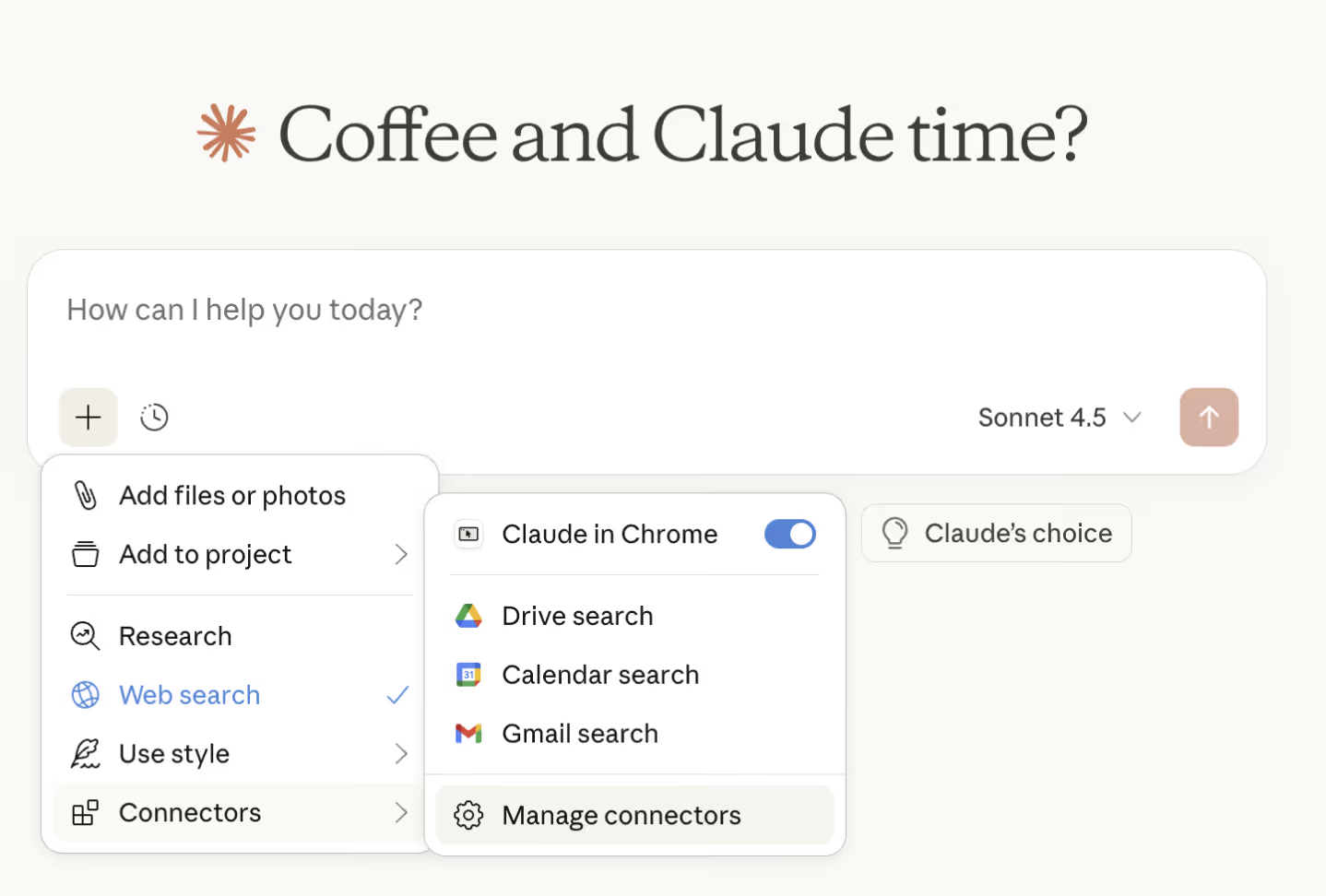
- Open the connectors menu in Claude
Click the + icon in the chat menu in the bottom left. From there, select Connectors, then choose Manage Connectors to open the connectors settings panel.
- Browse available connectors
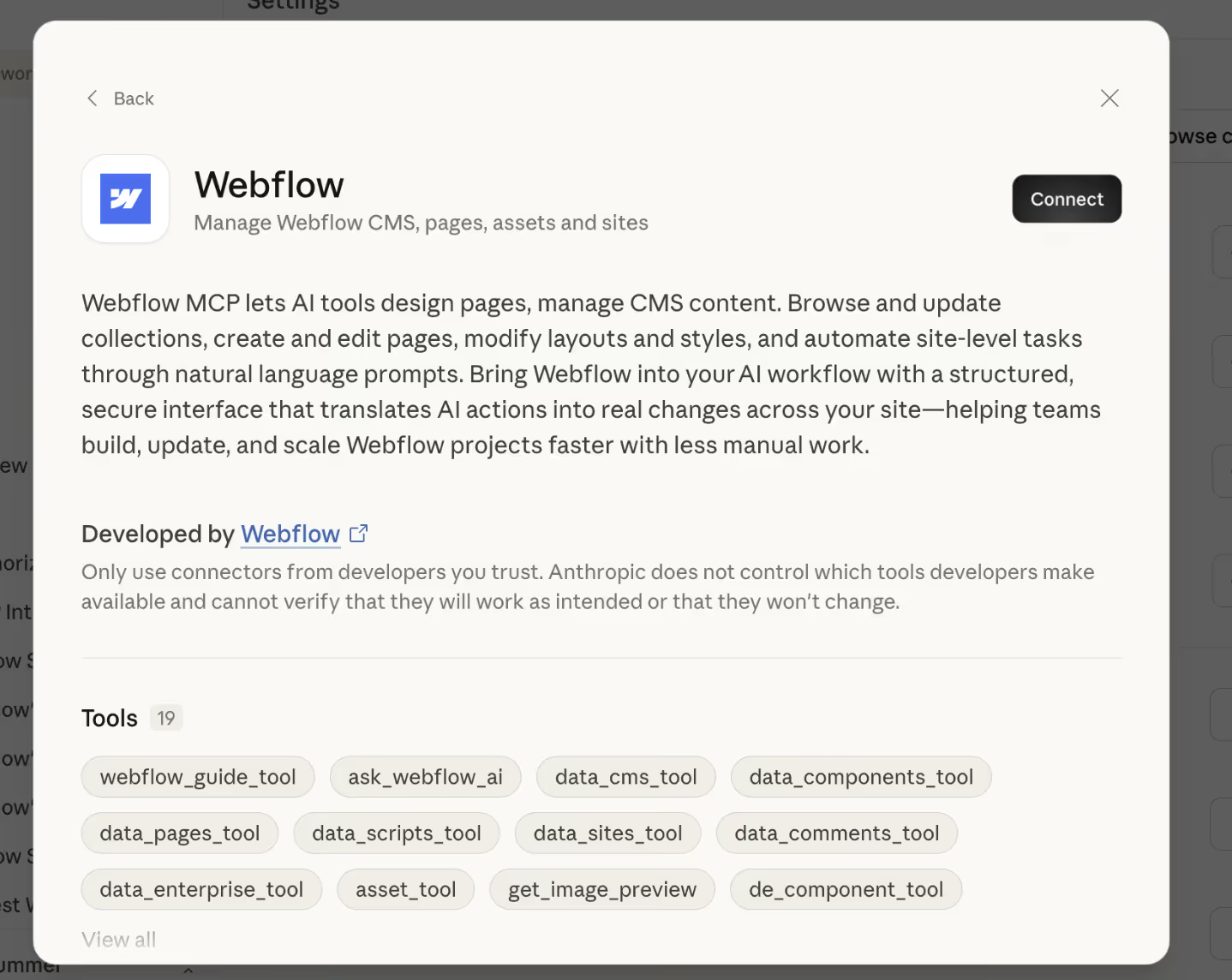
In the settings panel, select Browse Connectors and search for Webflow. - Add the Webflow connector
Click the "connect" button next to Webflow to begin the connection process.
- Authenticate your Webflow account
You will be redirected to Webflow. Review the requested permissions and choose which sites or workspaces Claude can access, then confirm access.
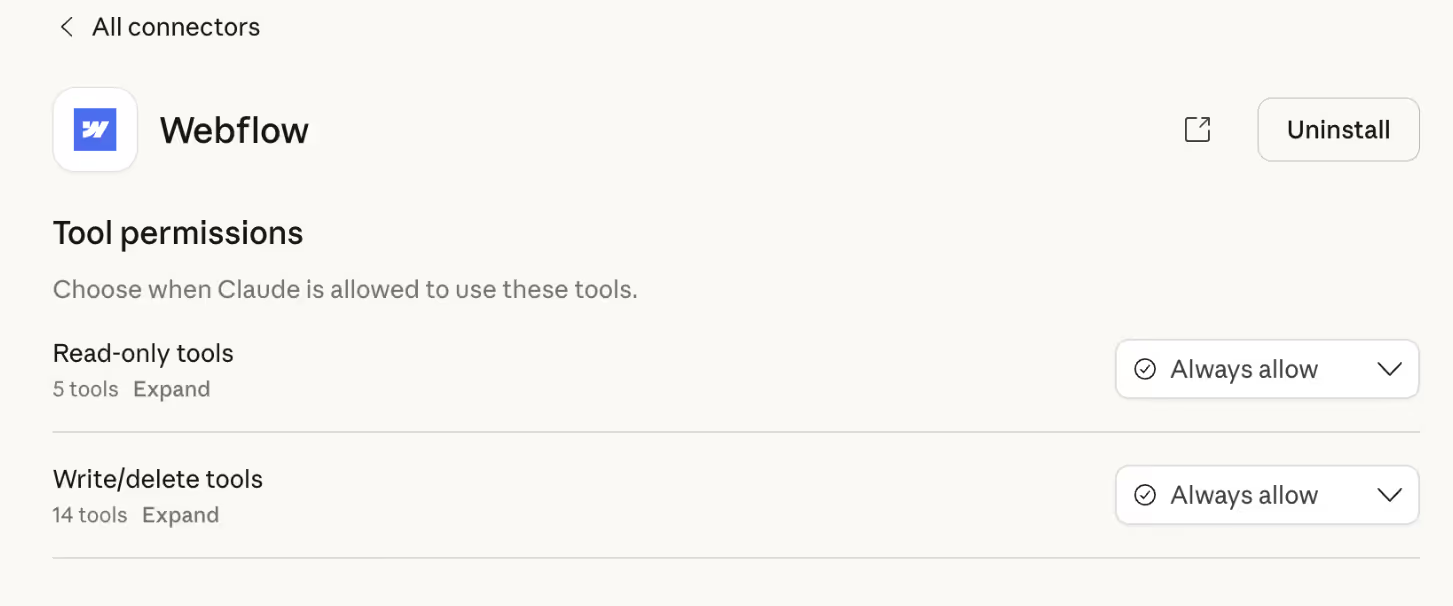
- Configure how Claude can act
Return to Claude and open the Webflow connector settings. Click Configure to choose how Claude is allowed to interact with your site. You can allow actions automatically or require approval before changes are made, depending on your workflow. - Start using the connector
Once configured, you can begin prompting Claude to retrieve content, suggest updates, and interact with your Webflow workspace.
Limitations to Be Aware Of
While the connector is useful, it is not a replacement for thoughtful workflows.
Claude does not operate autonomously. It relies on user input and requires human review before any changes are implemented. This ensures control, but it also means the quality of outputs depends on how the tool is used.
The effectiveness of the connector is also tied to the quality of your CMS. Poorly structured content will produce less reliable results, while clear and consistent systems will perform better.
Permissions are another consideration. Teams need to be intentional about what access is granted and how the tool is used within their workflow.
These limitations are not drawbacks as much as they are reminders that AI works best when paired with well-designed systems.
What This Signals for Webflow
The Claude connector is an early step, but it signals a clear direction.
Webflow is moving toward deeper integration with AI tools, not as standalone features, but as part of the core workflow. The platform is becoming more connected, allowing teams to interact with their sites in more flexible ways.
This does not fundamentally change what Webflow is today. It remains a design and development platform built around structured content and visual control. But it expands how that platform can be used.
For teams considering whether to migrate to Webflow, this kind of integration points toward a more connected and adaptable ecosystem.
More Tools Do Not Guarantee Better Workflows
If you are rethinking how your Webflow site is structured, maintained, and optimized over time, we are a dedicated Webflow agency designing systems that prioritize clarity, scalability, and long-term performance.